- Request
- Read access to
\\dc01\Operationsfor operations.alice; Finance stays restricted. - Basis
- Departmental access is granted through security groups, not direct user permissions.
- Implementation
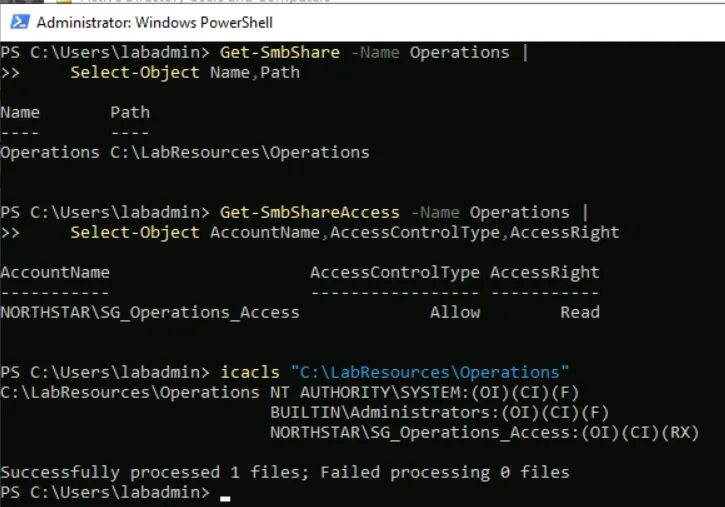
- Added to SG_Operations_Access. The group holds SMB Read and NTFS Read & Execute; no direct grant to the user.
- Validation
- From client01 as Alice: Operations ALLOW, Finance DENY.
- Closure
- Implemented and validated; access limited to the intended resource.
Case 01 · Ops Lab · Lab Simulation
Windows Access Administration and Troubleshooting
A user could still sign in to the domain but lost access to her department's file share. I narrowed the failure across five diagnostic layers to a missing security-group membership, restored it without touching resource permissions, and confirmed the unrelated Finance share stayed locked.
At a Glance
- Scenario
- Authorized user denied access to a departmental share
- Environment
- Azure VNet · Windows Server 2022 DC · Windows 11 Enterprise client
- Root Cause
- Missing AD security-group membership
- Outcome
- Access restored; Finance still denied
- Skills
- AD · SMB/NTFS · PowerShell · Diagnostics
01Environment
EntryAzure BastionNo public IP on either VM
VNet · 10.0.0.0/24
dc0110.0.0.4
Windows Server 2022 · AD DS + DNS · hosts both sharesclient01
Windows 11 Enterprise · domain joined · DNS → dc01Identity Model · northstar.test
- operations.alice
- Operations user. Should reach Operations and be denied Finance.
- SG_Operations_Access
- Security group that grants the Operations share. Its membership is the only thing the fault changed.
- \\dc01\Operations
- SMB share on dc01. Share and NTFS permissions name the group, never individual users.
- finance.chris
- Finance user. The Finance path was configured but not separately tested.
- SG_Finance_Access
- Security group for the Finance share. Alice is not a member, by design.
- \\dc01\Finance
- SMB share on dc01, granted only to SG_Finance_Access.
Each share grants its group Read (SMB) and Read & Execute (NTFS). No direct user permissions and no explicit DENY entries. Chris's path was configured but not separately tested.
02Access Matrix
User operations.alice, signed in on client01.
| Resource | Baseline | Fault | After fix |
|---|---|---|---|
\\dc01\Operations | Allow | Deny | Allow |
\\dc01\Finance | Deny | Not retested | Deny |
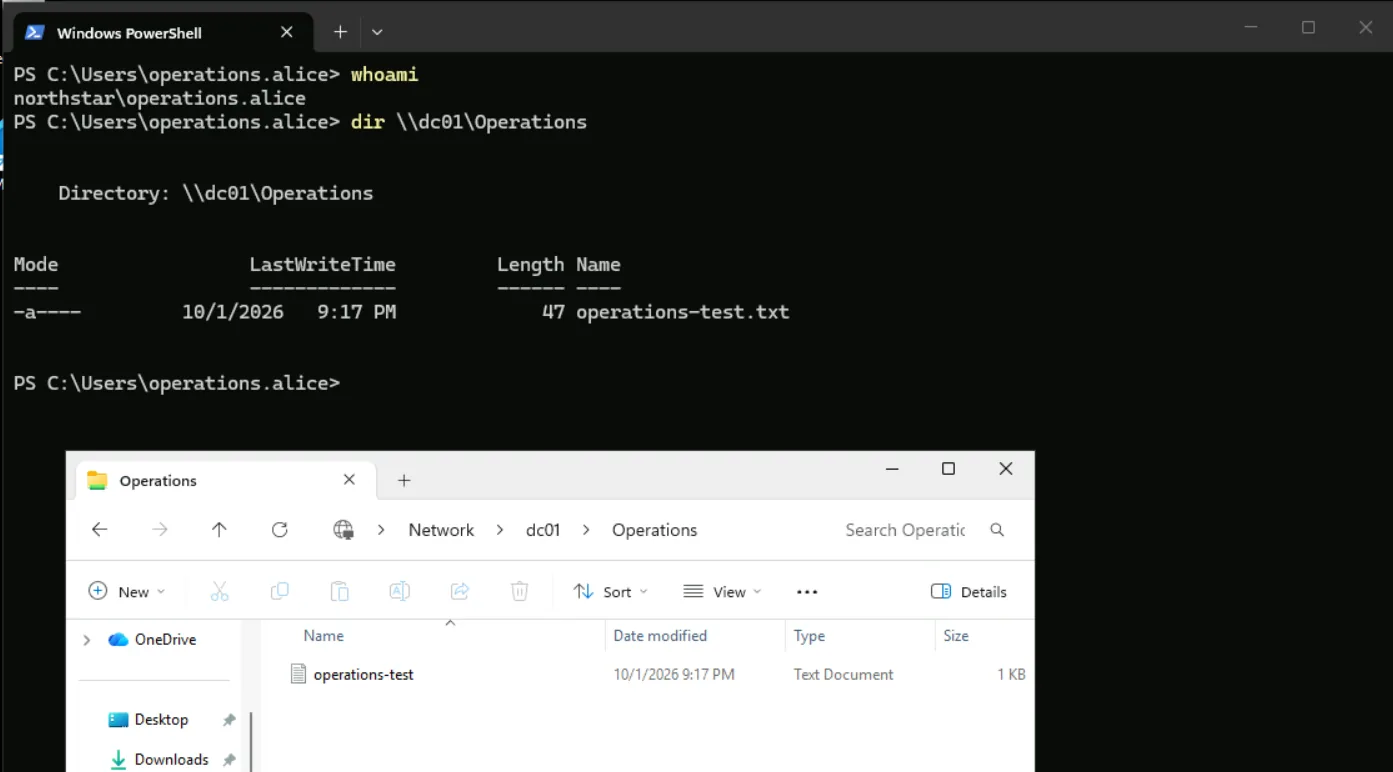
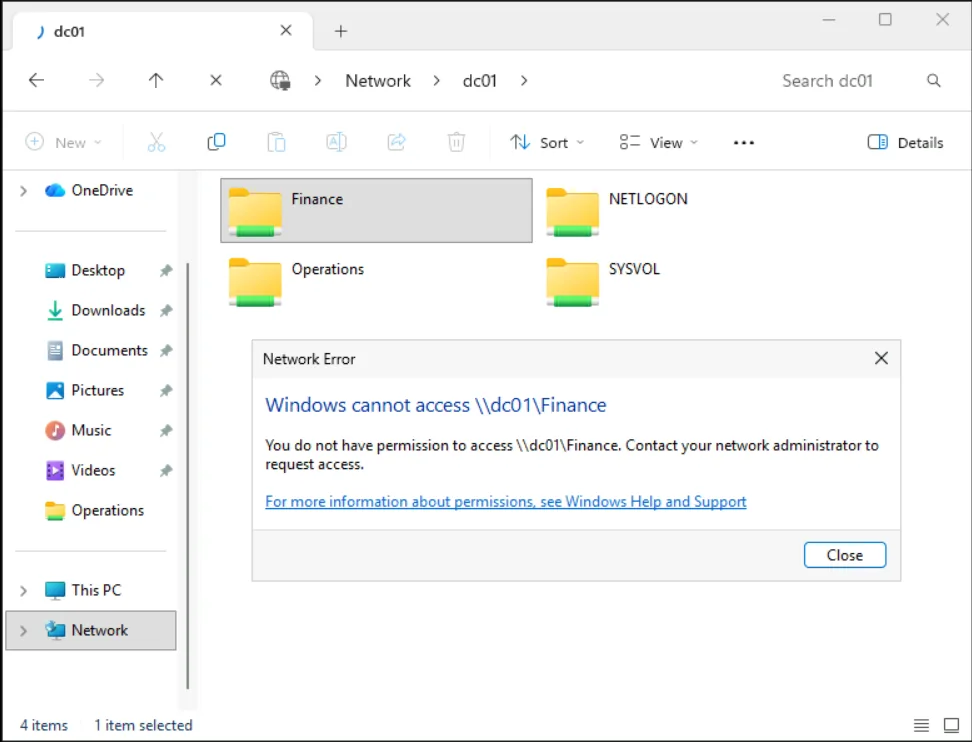
Expected and observed matched at baseline and after the fix: Operations allowed, Finance denied.
03Diagnostic Ladder
Checked in order, from account to permissions, before any change was made.
-
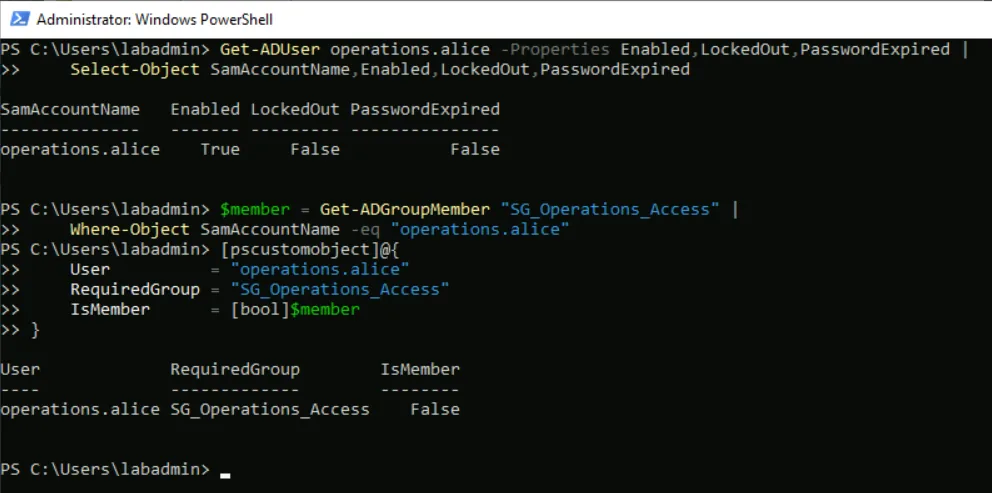
01Account and authenticationEnabled, not locked, password validOK
CheckedGet-ADUserreturned Enabled = True, LockedOut = False, PasswordExpired = False. Onclient01,whoamishowed Alice still signed in asnorthstar\operations.alice.If this had failedDisabled or locked account, or expired password: reset or unlock per policy.
-
02DNS and domain-controller discoveryClient resolves and locates dc01OK
CheckedResolve-DnsName dc01.northstar.testreturned10.0.0.4from the client.If this had failedClient not using the DC for DNS, so it can't locate the domain: fix the DNS settings.
-
03Network and SMB (TCP 445)dc01 reachable on port 445OK
CheckedTest-NetConnection dc01.northstar.test -Port 445returned TcpTestSucceeded = True.If this had failedFirewall or server service blocking SMB: check the path and the service.
-
04Security-group membershipAlice in SG_Operations_AccessFault
CheckedGet-ADGroupMember SG_Operations_Access, filtered for Alice, returned nothing: IsMember = False.FindingThe actual cause: Alice was missing from
SG_Operations_Access. -
05Share and NTFS permissionsGroup granted on the share and the ACLOK
CheckedGet-SmbShareAccessshowed SG_Operations_Access Allow Read, andicaclsshowed it with Read & Execute. No direct user entries.EvidenceIf this had failedGroup missing from the share or the NTFS ACL: restore the group entry, never a direct user grant.
04Timeline
- 1Healthy baseline
Alice opened
\\dc01\Operationsand was denied\\dc01\Finance, as designed. - 2Controlled fault
I removed Alice from SG_Operations_Access, leaving the account, network, DNS, and permissions unchanged.
- 3Logon refreshed
Alice signed out and back in, so her token reflected the change.
- 4Access denied
Reading from
\\dc01\Operationsnow returned "Access is denied." - 5Five-layer diagnosis
I checked account, DNS, network, group membership, and permissions in order.
- 6Root cause found
Layer 4 failed: Alice was no longer in SG_Operations_Access.
- 7Membership restored
I added Alice back to the group and left share and NTFS permissions untouched.
- 8Sign-out / sign-in
A fresh logon rebuilt her token with the restored group.
- 9Retest: Allow + Deny
Operations opened; Finance was still denied.
- 10Closed
I recorded cause, correction, and validation in the incident record.
05Records
- Symptom
- Alice could authenticate to the domain but could no longer open
\\dc01\Operations. - Scope
- Alice's access path to the Operations share.
- Root Cause
- Missing membership in SG_Operations_Access, so her refreshed token no longer held the authorized group.
- Correction
- Restored the membership. Resource permissions unchanged. Fresh sign-in to rebuild the token.
- Validation
- Operations ALLOW, Finance DENY.
- Closure
- Intended access state restored and validated; no open issue or escalation.
06PowerShell Helper
Checks a user's account state and whether they belong to a required group, the first questions in an access-denied ticket. It only reads from Active Directory and changes nothing, so it is safe to run before any fix.
Get-ADUserAccessReport.ps1 · read-only
param(
    [Parameter(Mandatory = $true)]
    [string]$Identity,

    [string]$RequiredGroup = "SG_Operations_Access"
)

try {
    $user = Get-ADUser `
        -Identity $Identity `
        -Properties Enabled, LockedOut, PasswordExpired, MemberOf `
        -ErrorAction Stop

    $groups = @(
        $user.MemberOf |
        ForEach-Object {
            (Get-ADGroup -Identity $_).Name
        } |
        Sort-Object
    )

    $isMember = $groups -contains $RequiredGroup

    [PSCustomObject]@{
        SamAccountName  = $user.SamAccountName
        Enabled         = $user.Enabled
        LockedOut       = $user.LockedOut
        PasswordExpired = $user.PasswordExpired
        RequiredGroup   = $RequiredGroup
        IsMember        = $isMember
        Groups          = if ($groups.Count -gt 0) {
            $groups -join ", "
        }
        else {
            "(none)"
        }
    }
}
catch [Microsoft.ActiveDirectory.Management.ADIdentityNotFoundException] {
    Write-Error "Active Directory user '$Identity' was not found."
}
catch {
    Write-Error "Unable to retrieve '$Identity': $($_.Exception.Message)"
}
Validated Checks
operations.alice· SG_Operations_AccessIsMember = Trueoperations.alice· SG_Finance_AccessIsMember = False- Nonexistent userControlled not-found error
It reads direct memberships only; nested groups are not followed.
07Evidence
Lab baseline · 01–05
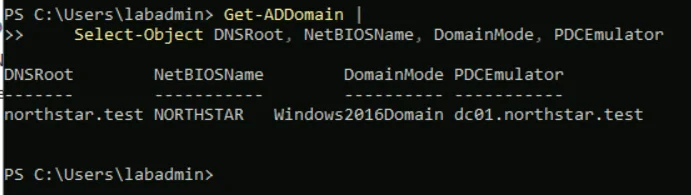 Screenshot 01Domain baseline
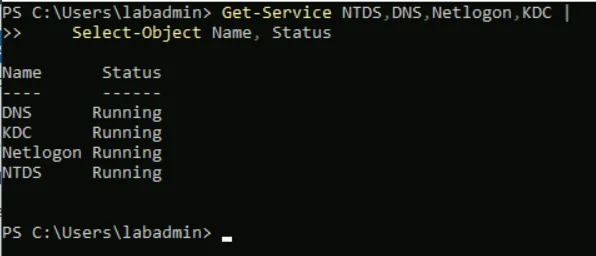 Screenshot 02Directory services running
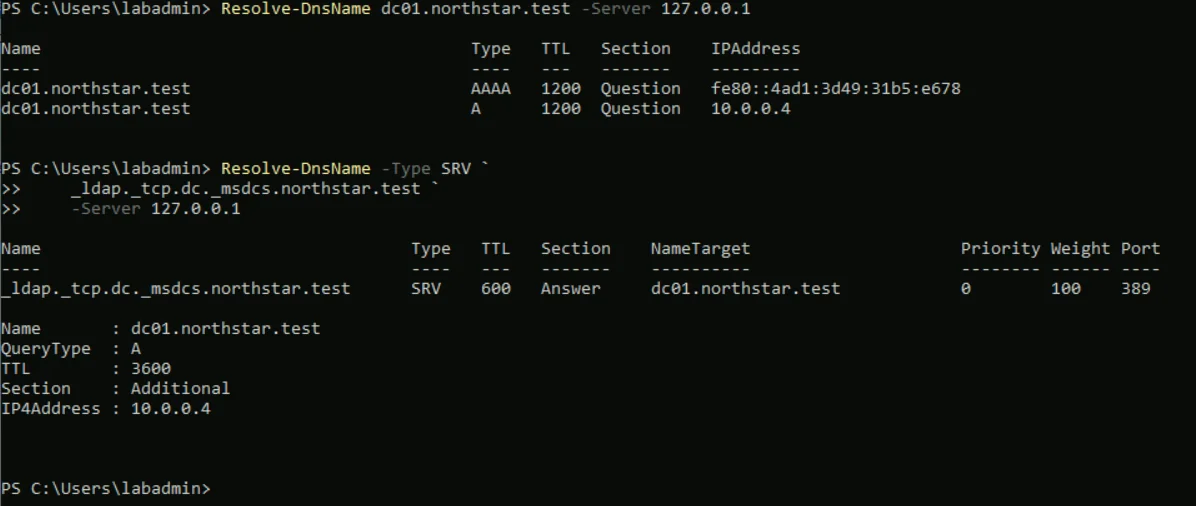 Screenshot 03Domain DNS resolution
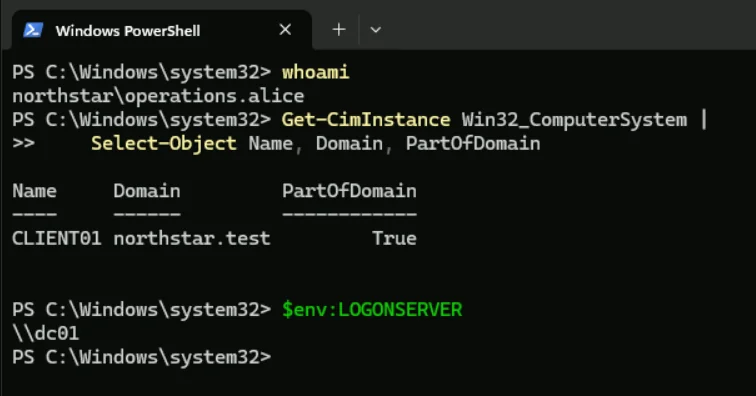 Screenshot 04Client domain membership
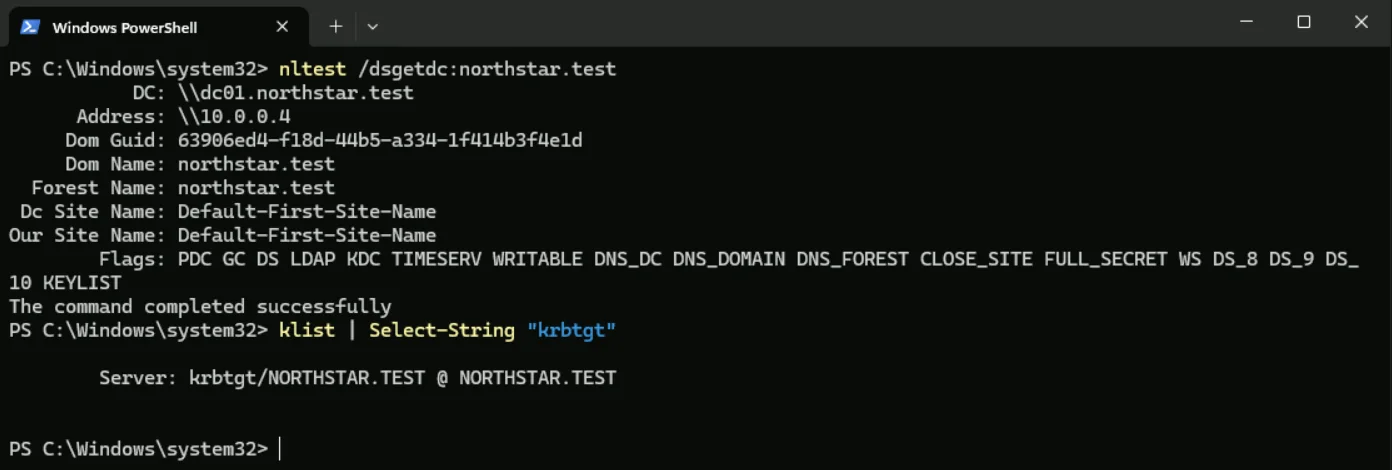 Screenshot 05Client domain authentication
Failure, fix and verification · 06–12
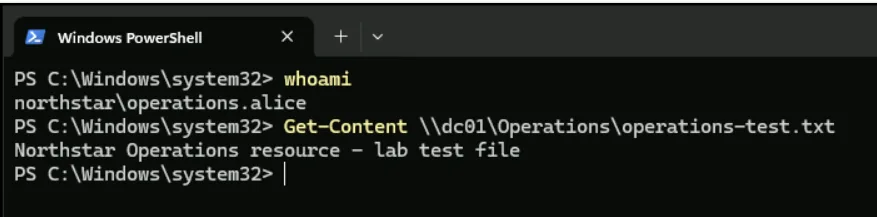 Screenshot 06Operations access allowed
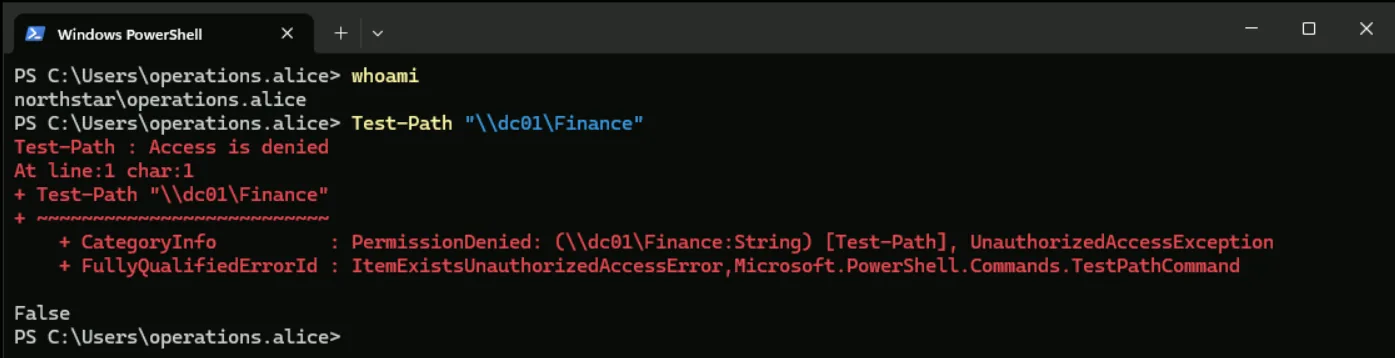 Screenshot 07Finance access denied
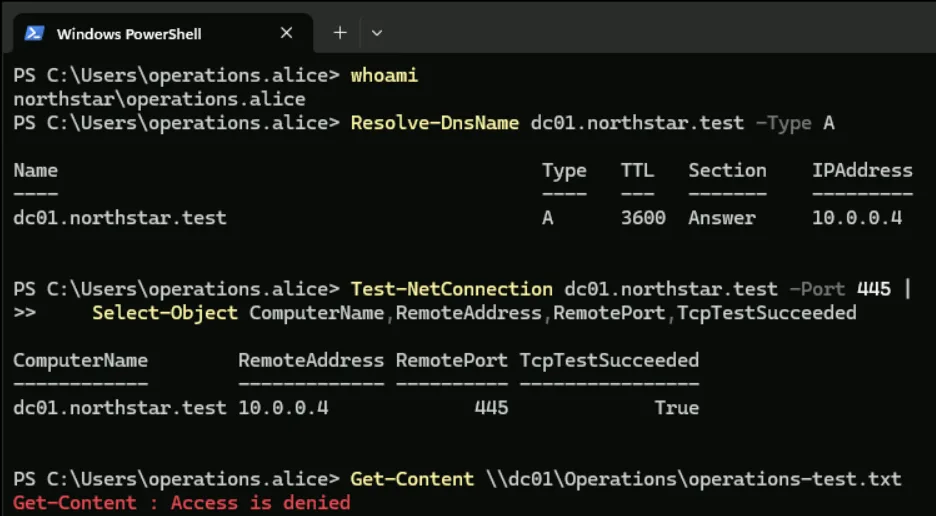 Screenshot 08Failure diagnostics
 Screenshot 09Account and group diagnosis
 Screenshot 10Permissions intact
 Screenshot 11Operations access restored
 Screenshot 12Finance still denied